
How to Process Academic Salary Programs

KBAs and UPKs

 KBA: How to Manage Position Funding in UCPath 
This KBA aid describes how to manage position funding.

UPK: Job Aid: Course Buyouts Note: UC San Diego uses Option 1.

Pre-Process and Overview

 Pre-Process and Overview

  • Visit the Negotiated Salary Program (NSP) drawer on the Salary Programs page for program policy, guidelines, and application information each year.
  • Questions related to the Health Sciences Compensation Plan (HSCP) participation should be routed to Health Sciences.
  • Participants can only belong to one of the two plans. See related systemwide policy and local implementation guidelines for additional restrictions and guidance.
  • For NSP Participants, approval letters (provisional or final) must be in hand before UCPath entry.
  • For NSP Participants appointed with joint/split appointments in multiple departments, the primary department will secure approval and process related payroll transactions in UCPath for the plan year.
    • Best practices are for funding managers from both departments to collaborate before applications are submitted, with transactional funding changes reviewed as applicable to ensure effort reporting goes smoothly on all projects.
  • FSEP and FLP Guidelines should be reviewed and Kuali Build applications approved before any UCPath entries.

System Steps: How to Process Health Sciences Compensation Plan (HSCP)

This quick reference describes how manage the Health Sciences Compensation Plan including system steps for PayPath. The same steps would be taken on the Template Based Hire. This plan utilizes multiple components of pay (MCOP) and, likewise, multiple Earn Codes.

Components of Pay,  Pay Component: Rate Codes,  Earnings Distribution: Earn Codes


X                UCHSX                    HSR
X                Prime UCHSP        HSP
Y                UCHSY                    HSN


When entering HSCP, in the Pay Components section:

  • Rate Codes UCHSP and UCHSX are automatically populated based on the Step
  • For Above Scale faculty, you will need to manually enter Rate Codes UCHSAX and UCHSAP, and their corresponding Comp Rate, for the X and X Prime, respectively
  • For faculty with bonus or market off-scale components, you will need to manually enter the appropriate Rate Code (UCHS01 for market off-scale; UCHD51 for bonus off-scale) and the associated Comp Rate
  • Manually enter the Rate Code UCHSY and the associated Comp Rate
    Comp Rate is an annual dollar amount per Rate Code

In the Earnings Distribution section:

  •  Earn Codes associated with each Pay Component should automatically populate; however, you may need to manually enter the rows, Earn Codes, and Comp Rate amounts
  • Comp Rate is a monthly dollar amount per Earn Code

System Steps: HSCP PayPath Update

These system steps apply to the Job Data in PayPath.

1. Navigate to: PeopleSoft Menu > UC Customizations > UC Extensions > PayPath Actions
2. Enter search criteria in the Find Existing Value tab
3. Click the Search button and select the employee record you want to update
4. Click the Job Data tab
5. Enter Action = JED and Action Reason = JED, click Tab
Note: Review the PayPath Transactions – Action Codes, Reason Codes and Descriptions (Academic/Staff) job aid on the Help Site for Transactional Users, as needed.
6. In the Earnings Distribution Type dropdown, select By Amount; this will make the Pay Component and Earnings Distribution sections editable
7. Update the Pay Component and Earnings Distribution sections, as needed
  • In the Pay Components section, Rate Codes UCHSP and UCHSX are automatically populated based on the Step
  • For Above Scale faculty, you will need to manually enter Rate Codes UCHSAX and UCHSAP, and their corresponding annual amounts, for the X and X Prime
  • For faculty with a market or bonus off-scale, manually enter the Rate Code (UCHSO1 for market and UCHD51 for bonus) and enter/update the associated annual Comp Rate, in the Pay Components section
  • If needed, manually enter the Rate Code UCHSY and enter/update the associated annual Comp Rate, in the Pay Components section
  • In the Earnings Distribution section, Earn Codes and monthly Comp Rates should automatically update; if they don’t, manually update them so that the HSR, HSP, and HSN
  • Earn Codes are each associated with the appropriate monthly Comp Rate

8. Once the Pay Components and Earnings Distribution sections are complete, enter a description of your actions in the Job Data Comments
9. Click on the Additional Pay tab
10. Click on the Additional Pay tab, add Initiator’s Comments for your approver, and click Save and
Submit


Next Steps

  • The Payroll Processing Calendar deadline for PayPath transactions is the Stop Processing PayPath & Position Management (5:00 PM) deadline. The transaction must be approved by this deadline to be processed with the current pay cycle.
  • No new PayPath transactions on this employee record can be submitted until the current transaction has been approved or denied.
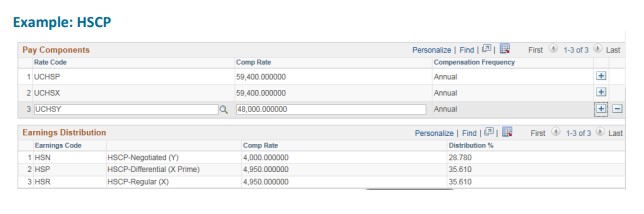
HSCP Image

System Steps: How to Process Negotiated Salary Program (NSP) Actions

 System Steps: Negotiated Salary Program PayPath Update

1.  Navigate to: PeopleSoft Menu > UC Customizations > UC Extensions > PayPath Actions

2.  Enter search criteria in the Find Existing Value tab

3.  Click the Search button and select the employee record you want to update

4.  Click the Job Data tab

5.  Enter Action = JED and Action Reason = JED, click Tab

Note: Review the PayPath Transactions – Action Codes, Reason Codes and Descriptions (Academic/Staff) job aid on the Help Site for Transactional Users, as needed.

6.  In the Earnings Distribution Type dropdown, select By Amount

7.  Update the Pay Component and Earnings Distribution sections, as needed


Component of Pay

Pay Component: Rate Code

Earnings Distribution: Earn Code

Scale Rate

UCANNL

REG

Off-Scale (Market and/or Bonus)

UCOFF1 (Market); UCDEC5 (Bonus)

Negotiated Salary Component

UCGCYN

NNC

When entering NSP in the Pay Components section:

  • Rate Code for UCANNL will automatically populate based on Step
    • For Above Scale faculty, you will need to manually enter Rate Code = UCABVE, and the corresponding annual amounts
  • Manually enter the Rate Codes UCOFF1, UCDEC5, and UCGCYN, as appropriate
  • Comp Rate is an annual dollar amount per Rate Code

In the Earnings Distribution section:

  • Earn Codes will automatically populate based on the Rate Code
  • Comp Rate is a monthly dollar amount per Earn Code
  • Comp Rate for REG may require manual entry and should be the monthly amount of UCANNL + UCOFF1 and/or UCDEC5
  • Comp Rate for NNC should automatically populate based on the Comp Rate for UCGCYN in the Pay Components section

8.a.  For employees already on NSP, the Pay Component section and the Earnings Distribution section will become fully editable for updates; make updates accordingly and ensure all dollar amounts appropriately reflect earnings

8.b. For employees not yet on NSP, the REG Earn Code will populate in the Earnings Distribution section; the Comp Rate in the Earnings Distribution section may be blank; take the following actions:

  • Click the Add a New Row [+] button in the Pay Components section
  • In the new row, enter Comp Rate Code = UCGCYN click Tab; in the Comp Rate field, enter the amount of annual pay associated with this component of pay
  • In the Earnings Distribution section, you need two rows; a REG and an NNC Earn Code row may have automatically populated based on the Comp Rate Codes in the Pay Component section
  • If needed, use the Add a Row [+] button to ensure that there are two rows; one for the REG Earn Code and one for the NNC Earn Code
  • You may then need to enter the Comp Rate associated with the employee's REG pay; this should be the monthly amount of UCANNL + UCOFF1 and/or UCDEC5 pay
  • You may then need to then enter the Comp Rate associated with the employee's NNC pay; this should be the monthly amount of UCGCYN pay

9.  Once the Pay Components and Earnings Distribution sections are complete, enter a description of your actions in the Job Data Comments

10.  Click on the Additional Pay tab

11. Click on the Additional Pay tab, add Initiator’s Comments for your approver, and click Save and Submit

Next Steps

  • The Payroll Processing Calendar deadline for PayPath transactions is the Employee Data Change Deadline. The transaction must be approved by this deadline to be processed with the current pay
  • No new PayPath transactions on this employee record can be submitted until the current transaction has been approved or denied.
  • For faculty who cease participation on June 30 and will not participate the following year, you must manually remove the UCGCYN comp rate row and Job Earnings Distribution (JED) effective 7/1. Use JED/RET as the action/action code, change Earnings Distribution Type to None, and hit the minus (-) sign on the UCGCYN comp rate line to delete the row.
  • Summer salary transactions will also require additional care. 
  • All participant records should be checked after 10/1 to ensure any increases in covered compensation (scale rate and market and bonus o/s increases) served to reduce the Negotiated Salary Component by the same amount as the covered compensation increased.
  • Please note: Retroactive review-related changes for NSP participants will require changes to the main faculty appointment and the summer salary rates
  • Retroactive transactions processed after a range adjustment will also require a manual re-entry of a range adjustment line, effective 10/1, by the department. Please contact APS with questions. 

System Steps: How to Process Faculty Salary Exchange Program (FSEP) or Faculty Leverage Program (FLP) Transactions

Approved FSEP or FLP transactions are entered as funding changes during the pay period of the impacted quarter/s.  

See the UPK for Course Buyouts above (this campus uses Option 1) for FLP transaction guidance.

There is no job aid specifically for FSEP transactions, but they must follow approved FSEP percentages across quarterly pay dates and can be processed as fund changes, using the above KBA for position fund changes.